
New features in ver 2.3.15
1. Simplify character control
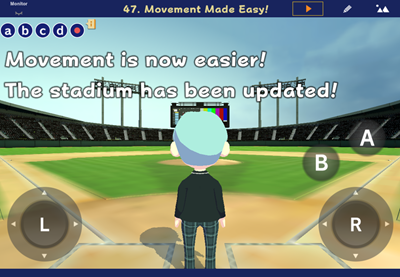
We have added six new controller objects to make object control simpler.
Add Object → “Tool” tab → Left Stick, Right Stick, A Button, B Button, X Button, Y Button
- These can be used as alternatives to a physical game controller.
When an external game controller is connected, the on-screen left and right sticks and buttons disappear, and all operations assigned to these objects can be performed directly with the controller. - Left Stick: Use the block “Control (WASD) [self] with controller [1]” from the Event category to move a character.
Right Stick: Use the block “Set moving camera to [self] pos [back] Move camera with mouse [on]” from the Camera category to control a camera. - You can see sample programs in:
Play > New Object > 47. Movement Made Easy!
2. Object Update
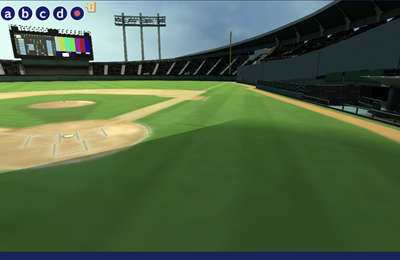
We have refreshed the “Ballpark” background.
It is used in Create > New objects >47. Movement Made Easy!
3. New Blocks
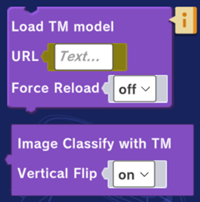
Added a block for using machine-learning models trained by Teachable Machine in Mind Render (Technique category).
* The models must be converted into Sentis format in Unity Editor beforehand.
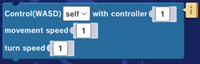
- You can now simplify character control that previously required multiple blocks. (Event category).
- Previously, you had to create separate control programs for touchscreen (on-screen joypad), keyboard (WASD keys), and game controllers. With this block, you can now create a single program that supports all three control methods.
- You can see sample programs in:
Create > New objects > 47. Easy Movement!
4. Mobile Optimization
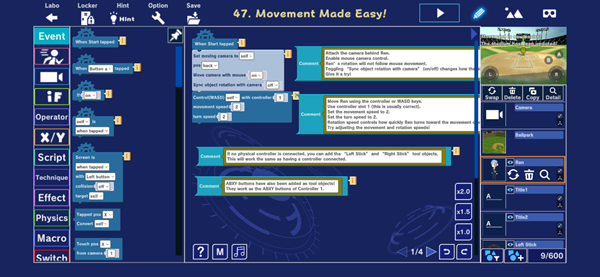
Buttons on the program editing screen are now larger and easier to use on smartphones.
5. Update Recommendation
When running or downloading programs created with older app versions, a link to the app store will now appear recommending you to update to the latest version.