
New features in ver 2.3.19
1. New Labs: “Let’s create a game together” — Create Your First Game in 30 Minutes!
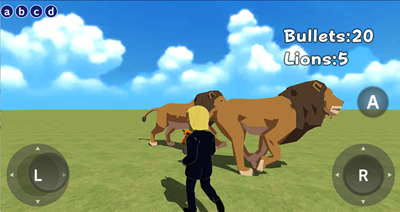
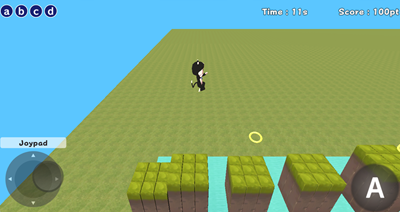
We’ve launced new beginner-friendly labs, “Let’s create a game together.” Based on the concept that even beginners can create a game in just 30 minutes, these labs guide you through building a simple game step by step while following the text instructions. We offer a introductory shooting game and a slightly more advanced side-scrolling game. (Tutorial text available in Japanese only)
2. New Objects
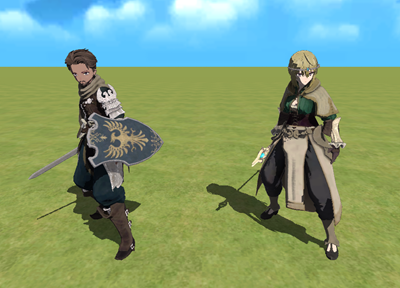
We’ve added customizable characters (with parts such as hairstyles, faces, and costumes) and weapons (sword, staff, and shield).
You can check them out in the lab below:
Create > New objects > 55. New Customizable Character!
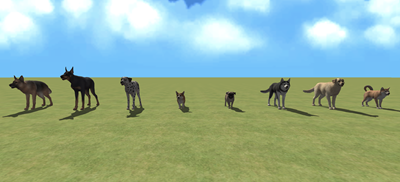
We’ve also added dog models (8 breeds) and barking sounds (12 types).
3. Reorganization of Blocks in the “Dialogue” Category
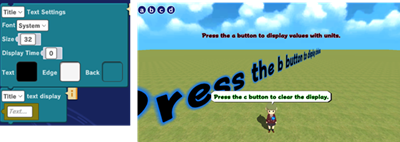
We reorganized the blocks in the “Script” category. Previously, you needed to choose different blocks depending on the text type or speech bubble style, but now you can use the same single block regardless of the object type.
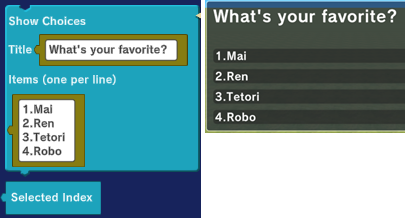
We’ve added a block to display choices,
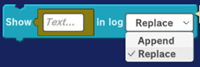
We merged two blocks that display text at the bottom of the screen.
You can learn how to use these blocks in the lab below:
Create > New objects > 53. Dialog Made Easy!
4. New Blocks
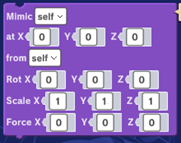
We’ve added a new “mimic” block. With just one block, you can set a mimic’s position, angle, size, and the strength of the force applied after it’s created. (“Technique” category)
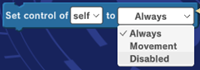
We’ve also added a block that prevents controller input while a character’s motion is being played when the character is controlled by a controller object. (“Event” category)
You can learn how to use these blocks in the lab below:
Create > New objects > 54. Mimic Made Convenient!